Follow us on Facebook
Powered by: Internetsmash
Showing posts with label Blog Tips and Tricks. Show all posts

Wednesday, 26 February 2014

How to add keyword in blogger

How to add keyword in blogger 

I find many people having problem with the keywords in blogger.
Ok Now I will show you a trick that will help you to put keywords in blogger to get standard traffic in your site and  let search engine find your site quickly.


to add keyword go to
blogger dashboard>template>Edit HTML>proceed

then add this code:

<meta content='DESCRIPTION HERE' name='description'/>
<meta content='KEYWORDS HERE' name='keywords'/>
<meta content='AUTHOR NAME HERE' name='author'/>
fill it up with your description,keyword and author name.
Then copy it and paste it after this code

<b:include data='blog' name='all-head-content'/> 

here's a screenshot:
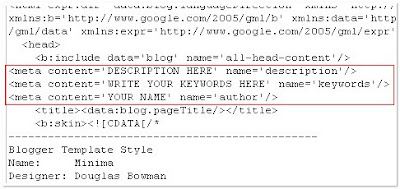
add the code just like this

Don't forget to add description and keywords.
and save the changes.
IMPORTANT:
Many people are just filling the meta description with keywords. DON'T DO THAT. Google and other search engines will ban your site from the search engines list if you repeat your keywords too often. Make sure you don't repeat any keyword more than 3 times.
That's it!You have successfully added the metatags to your blogger(blogpsot) blog.If you want to check whether you added the meta tags correctly or not,just type 'meta tags analyzer tool' in the google and you will find so many sites which can check whether you have added the tags correctly or not.


Read More

How Will You Look After 20 Years

20 Years Bad Ap kesay Nazar Aye Gay

Dosto Aik Funny Software Lay Kar Aya Hon.
Software Name: Prophecy Master
Iss Software Say Ap Apna 20 Saal Bad Ka Chehra Dekh Sakte Hain.
Zara Picture Dekhein Umeed Han Apko Pasand Aye Ga.


Download: 
 Note: Download k Click k Bad 5 Sec k Bad Right Top Side Pe "Skip ADD" Karen!
Read More

Tuesday, 25 February 2014

How to Add a Facebook Follow Button in Blogger

How to Add a Facebook Follow button in Blogger?


The first thing you need to do is to go to Facebook Social Plugins website page.(THERE SELECT THE TYPE OF BUTTON YOU WANT TO ADD TO YOUR BLOG)

Now enter the complete URL of your Facebook Profile for which you are willing to generate the follower button. There are a lot of options for customization which could help you in creating a perfect match for your website. just like :


After entering your Profile URL, you can clearly see how your widget would appear on your website. Once bit of customization is done, press the “Get Code” button at the bottom.
Now a new window would pop out, select the “iFrame” Tab and copy the code.Just like:


Now paste it anywhere you would like to show this widget. For example, if you are willing to show it in your sidebar then, go to Blogger.com >> Layout >> Add a Gadget >> Add HTML/JavaScript and simple paste the code there.

===>Congratulations: Once everything is down, simply press the “Save” button and your Facebook Follow button is ready, and good to be live on your website. Now go and check your website to see the Follow button in live action.

We hope this tutorial has helped you in learning how to add a Facebook follow button in blogger? What are your thoughts about this follow button? Does it really worth it, or you are happy with Google+ followers gadget? Let us know about your experience. <===
Read More

How To Add Text-Box And Text-Area to Blogger

Learn How To Add Text-Box And Text-Area to Your Blogspot


There are times when you want to insert plain text into your Blog Post or template. This may be a piece of HTML code or JavaScript that you would like readers to copy, such as the “Link to Our Site” code in the sidebar. It could also be the Terms of a Legal Agreement that users can view. As we shall be discussing in our article on creating forms in Blogs, the text box can also be used in feedback forms for users to input feedback and comments.


The HTML code of the text box makes use of the <textarea> property. For the text box to be in a Blog Post, while drafting the Post, switch to “Edit HTML” mode to insert the following code. If it is to appear in the sidebar or other parts of the template, go to Template -> Page Elements -> Add a Page Element and select “HTML/JavaScript” to insert this code.


=>Users can input text

The textarea HTML code which allows users to input TEXT is this:-
<textarea rows="5" cols="40">
TEXT
</textarea>

The attribute cols indicates the number of visible columns and the rows shows the number of visible rows. Note that this simply sets the dimensions of the text box. The lines of text can exceed the specified area, and when that happens, there will be scrollbars at the sides to allow users to view all the contents. In the above code, users can input words and characters into the text area. There is no limit to the amount of text that can be inserted but browsers may have their own preset limits. This is what readers will see:-


=>Read only Textbox

If the text box contains terms and conditions or information, we can insert a <readonly> attribute into the textarea code. Readers can view the text but they cannot edit or amend it, or insert any input into the box. This is the HTML code:-

<textarea rows="2" cols="30" name="Famous Quotes" readonly="readonly">
“Asking a working writer what he thinks about critics is like asking a lamp-post how it feels about dogs.” ... Christopher Hampton
</textarea>


We changed the value of the rows and cols to give you an idea how big the boxes will be with these values. A name can be assigned to the textbox for scripting purposes. Here, we have set it to display a readonly text which users cannot edit, but can still select and copy, like this:-


=>Link to Site Text Box

To display a code for readers to link to your Blog, you can make use of the <readonly> attribute. Instead of text, insert the Hyperlink HTML code. The textarea code can be this:-

<textarea rows="4" cols="25" name="Link to Site" readonly="readonly">Hyperlink Code</textarea>


=>Textarea Word Wrap

This is perhaps more relevant when we apply the textarea code to forms. When the text reaches the end of a row, the words can be wrapped in these manners:-

"soft" wrap – text will wrap as the user types but line breaks are not included when the text is submitted in a form.

"hard" wrap – if users enter line breaks into the text, it will be shown in the submitted form.

wrap is "off" – this will put all the words in one line, without any line breaks or wrapping.

The default value is "soft" wrap.

<textarea rows="8" cols="30" wrap="hard">
TEXT
</textarea>


Read More

Increase Your Blog Traffic

Ways to Increase Your Blog Traffic :

Consider some of the things that produce a blog and a blogger? Is it just your money or the fame? OK. Most of you should say yes, but what constitutes towards money or fame as a blogger. Without a doubt. It is the band of visitors that read your site which makes you blogger and acquire some fame by yourself. A blog is usually nothing without its readers.
Everybody knows you could get a lot of blog traffic from social networking, guest posting or perhaps from blog commenting, for example. But here My goal is to share some invisible yet effective secret affordable more traffic for your blog that usually are neglected.
let’s start revealing hidden secrets that you have to know to boost up your site traffic. Let’s proceed.: )
.

1.  Trackbacks and Pingbacks

Trackbacks and pingbacks are 3 strategic features in which get neglected by almost all of the bloggers. Why strategic? Because with the proper strategy, you can increase your site traffic to a terrific extent. Both of them are almost equivalent features but you will find there’s small difference between both of them. Before explaining the actual difference, let us clear the thought of trackbacks and pingbacks inside prospect of weblog traffic.
Imagine I write a post within my blog. You write one more post and for the reason that post, you connect to my blog publish. Now my blog will likely be notified about your website post and plainly accept the trackback/pingback and if I have enabled the feature to indicate them at the blog, then at the end of my blog post, a link in your blog post will be added either from the comments section or like a separate field pertaining to trackbacks/pingbacks.
.
1365_10152356948376996_570662079_n
.
How do this increase your website traffic? Usually visitors possess a habit of relocating their eyes towards the end of the post to find similar content along with links to different great content and when they see the blog’s link having a catchy title just towards the end of an awesome content with a pro-blogger. I know you were given it now!
Now the difference concerning a trackback and a pingback is that trackbacks are manual and they are implemented in another manner (read concerning using trackbacks within WordPress here) whereas pingbacks are programmed and need zero special implementation technique.
Just hyperlink to the other blog post from your blog and they will receive a pingback notice. If they accept it of course, if their blog style uses the pingback characteristic (some bloggers don’t take advantage of this feature to prevent spam) your projects is done.
.

2. Utilizing The Most Out Of E-books

E-books are not just a treasure of resources on your readers, but also a full book to advertise on your own and to use its space as well as attraction. If you are writing an ebook about suppose “Increase Your site Traffic 10 Times” then always link to your blog and similar important sites within the blog several times (without spamming) since you can.
The e-book can be free and can be reaching a huge band of different people, a lot of them might not even know about your blog if they downloaded the ebook from a few other source. So e-books works extremely well very effectively to be able to attract traffic for your blog, and most importantly to attract those people who are interested in the blog content and who would like to read more of your creation.
Just link to every possible similar content for the proper places from the e-book content.
.
59917_397977230306843_1517103048_n
.

3. Driving Blog Traffic from YouTube Videos

After Google listings, YouTube videos will be the most watched content on the web. People watch videos to understand tutorials, to solve their problems and for everything that a video could express better plus more easily than words and phrases.
Occasionally, videos can get much more views than your website posts. And placing links from the video description, or by using incentives in the video to see your blog, you can drive plenty of traffic to your website easily.
Concentrate on building up your own YouTube channel subscribers. Upload more plus more videos and seek to rank them same as you try with all your blog posts. Who knows maybe you’re following video gets viral and your blog!
.

4. Did You Forget Scoop.it?

Info. it is any content curation site that permits you to share your thought processes and posts in a magazine style. 
For those who have never before attempted Scoop. it, then here’s the right time!
.

5. Buy Blog Traffic with PPC Advertising:

In the end, if you are seeking more traffic to your blog, then the final very effective method is always to buy visitors to your blog. And with contextual ad networks like Google Adwords, Marketing. net and some others, driving traffic is neither difficult nor much high priced.
With PPC, the most important benefit is that you receive to pay limited to every click. Besides on other websites, but you also can advertise your blog about the social media like Facebook because of the Facebook ads and sponsored threads.
In many unique ways, social networking advertising is way greater than Adwords or some other contextual ad communities.
.
things-to-do-after-installing-wp-300x300
.

Conclusion

While said earlier, a new blog is described by blog traffic. I you are trying to find success with your current blogging career, then traffic is the main requirement you ought to achieve.
Just what exactly are your approaches and tactics with regards to blog traffic? Have you got any other secret ways to increase blog targeted visitors, something that When i missed?
Ways to Increase Your Blog Traffic: Do comment and share your views!
 .

blogging tips

blogging tips blogging tips blogging tips blogging tips blogging tips
Read More

How To Increase Website+blog TRAFFIC Easily


.

How To Increase Website TRAFFIC Easily

Making great article is tough to say the least. If you feel the effort of making good content, you want to improve its value. Value can be created in lots of ways, but generally the more traffic your article generates,the more valuable it is to you. So here’s tips on how to easily boost the traffic to your good content. Using a combined Term Cloud Report plus the Unique Word Visit Influence Report you’ll be able to quickly make an educated gamble by tweaking your titles of pages to increase traffic.  
website-traffic-1
.
.

A) TERM CLOUD REPORT

This offers a visual representation of each search phrases driving the most traffic in your most visited website post.
.

1) Login to Google Analytics

.

2) Set the date range to the last 6 months

.

3) Goto Traffic Sources >> Sources >> Search >> Organic & set Primary Dimension to Landing Page

.

4) Click on the most visited blog post in report

.

5) Set the Primary Dimension to Keyword

.

6) Setup a filter to Exclude that Keyword which are Matching “(not provided)”

.

7) Select Toggle-view to Term Cloud

.
.

B) UNIQUE WORD VISIT INFLUENCE REPORT

This will reveal how many visits every single word is contributing to your popular website article.

foundation-responsive-design-framework.

1) Login to Google Analytics

.

2) Set the date range to last 6 months

.

3) Go to Traffic Sources >> Sources >> Search >> Organic & set Primary Dimension to Landing Page

.

4) Click on the most visited blog post in report

.

5) Set the Primary Dimension to Keyword

.

6) Setup a filter to Exclude Keyword that are Matching “(not provided)”

.

7) Set rows to show 5,000

.

8) Export the report as an Excel file

.

9) Copy & paste the Keyword column to Column A of a new sheet of Excel file

.

10) Run the following macro on the Keyword column of your report:

.
<span class=”adtext” id=”adtext_2″>Option Explicit</span>
PublicSubUnique_List()
Dimmy_range AsRange
Dimmy_Sheet AsWorksheet
DimAll_Strings AsVariant
Dimx AsVariant
Dimy() AsString
DimlLoop AsLong, lLoop2 AsLong
DimTemp_Sheet AsWorksheet
Redim y(1)
Application.ScreenUpdating = False
Application.DisplayAlerts = False
Application.Calculation = xlManual
Setmy_Sheet = ActiveSheet
Withmy_Sheet
Setmy_range = .Range(“A1:A”& .Range(“A”& Rows.Count).End(xlUp).Row)
All_Strings = my_range
ForlLoop = LBound(All_Strings) ToUBound(All_Strings)
x = Split(All_Strings(lLoop, 1))
ForlLoop2 = LBound(x) ToUBound(x)
Redim Preservey(UBound(y) + 1)
y(UBound(y)) = x(lLoop2)
NextlLoop2
NextlLoop
SetTemp_Sheet = Worksheets.Add
Temp_Sheet.Range(“A1:A”& UBound(y) + 1) = Application.WorksheetFunction.Transpose(y)
Temp_Sheet.Rows(“1:1″).Delete
Temp_Sheet.Range(“A1″).Value = “HEADER”
Temp_Sheet.Range(“A1:A”& UBound(y) + 1).AdvancedFilter Action:=xlFilterCopy, CopyToRange:=Temp_Sheet.Range(“B1″), Unique:=True
Temp_Sheet.Columns(“A”).Delete
Temp_Sheet.Rows(1).Delete
.Columns(“B”).ClearContents
Temp_Sheet.UsedRange.Copy .Range(“B1″)
EndWith
Temp_Sheet.Delete
SetTemp_Sheet = Nothing
Application.Calculation = xlAutomatic
Application.ScreenUpdating = True
Application.DisplayAlerts = True
End Sub
.

11) It will Extract all unique words from  keywords and put them incolumn B 

.

12) From Exported Google Analytics report, Copy & Paste the Visits column in Column C of your new sheet next to the original Keywords. Must Remove the total-Visits from the bottom of this column

.

13) In Column D use the following SUMIF formula & drag it through entire list of unique words:

1
=SUMIF($A$2:$A$5000,"*"&B2:B2&"*",$C$2:$C$5000)

14) Copy column D & Paste the values. Now use Sort function to Sort By Column D, Sort On Values, Order is like Largest to Smallest

.
.
.
.

C) HOW TO USE THE REPORTS

1) Utilize the Term Cloud report to visually make suggestions on words that are very important to keep stringed in (i. e. phrases commonly found throughout a lot of the specifics phrases driving one of the most traffic to your website post). Check out for patterns between largest phrases & then assemble a totally new page title structure determined by these patterns.
2) Utilize the Unique Word Visit Influence Report to take into consideration words driving lots of traffic which can be currently missing from your blog post’s page title, though ignoring Stop Words. This report can show you how on modifiers to consider using to increase optimize your blog post page title.
3) Select your 10 most favored blog posts and take pleasure in the additional traffic, merely via well educated page title adjustment.
.
.

D) THE RESULTS

.
foundation-responsive-design-framework
.
The phrase Cloud report guiding many recent page title modifications on my website, I surely could achieve the above final results for three of my popular website posts (when comparing one week to the prior week). It  took about 20 minutes, it was well worth the effort to me. Recently i have created additional page title adjustments while using Unique Word Visit Influence Report at hand and i am anxious to see this results.

Read More